I could build this much with AI as a two-person team.
Behind the scenes of developing ‘My Healing Picture Book’ and the complete feature list
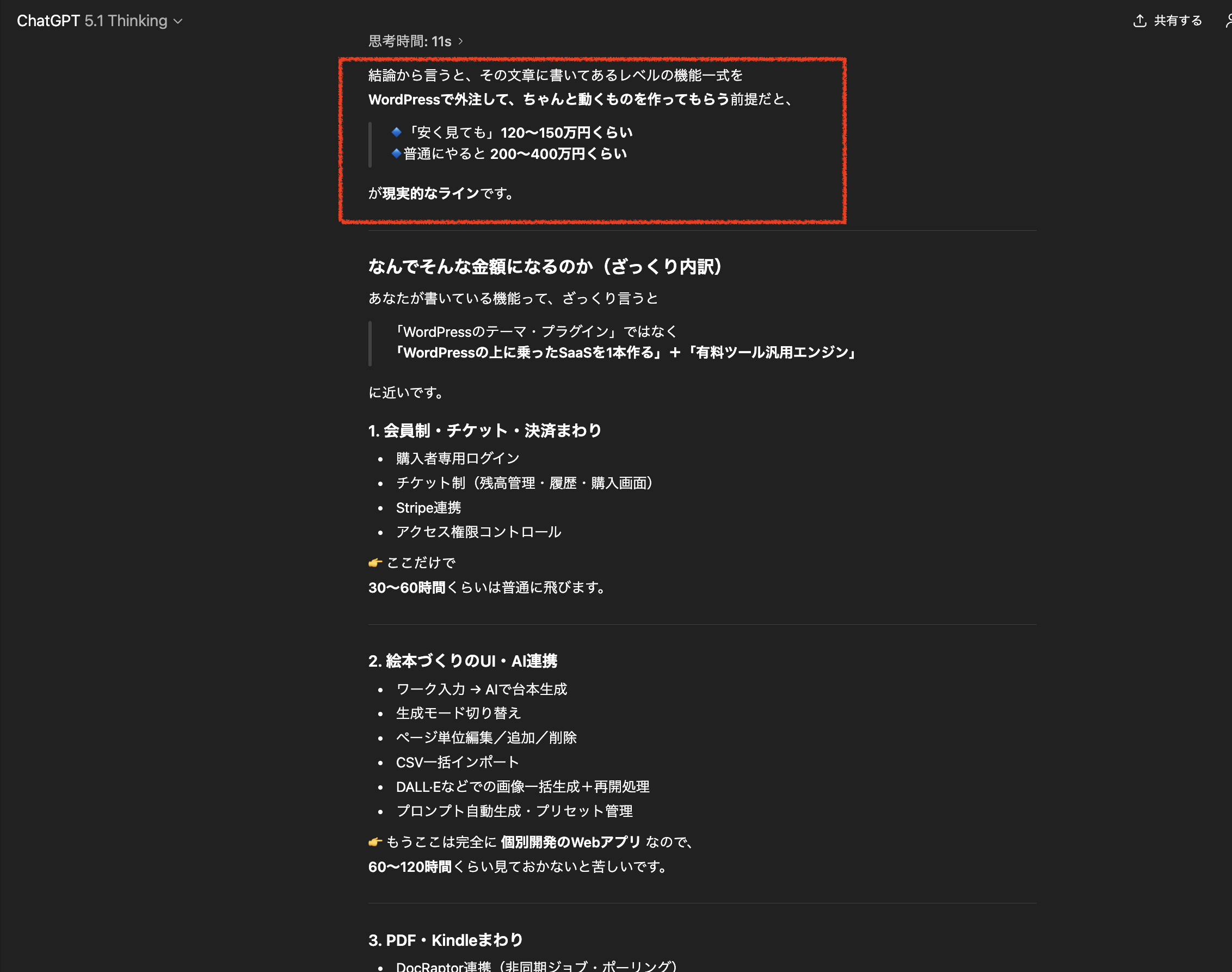
I entered all of the information about every feature I built this time into the latest model, ‘GPT-5.1 Thinking,’ had it review the full feature set, and then asked how much it would cost if I outsourced it to a freelancer!
Introduction: Let’s show what’s really inside the words “I made it with AI”
“With AI, you can already build things at this level now.”
This isn’t just pretty talk or a sales line,
I myselfwhile running my brain at full blast and getting headaches over and overhave felt this firsthand.
But if I simply say, “I made it with AI,”
- it can sound as if AI did everything on its own
- and it doesn’t really convey how hard it was or how large the system actually is.
That leaves a kind of vague feeling.
So in this article,
- for ‘Sayonara Monster’ + the buyer-only feature set ‘My Healing Picture Book’,
I’m going to list out every feature that is actually running right nowone by one. - And I’ll also write about
what scale it would likely be if you asked a regular freelancer or development companyin terms of work volume—that is, money and man-hours. - And at the end,
I’ll honestly write about the very real fact that
“I did not just hand everything over to AI; I also pushed my own brain quite hard.”
The big picture: what did I build?
To put it simply, what I built is
a web system based on ‘Sayonara Monster,’ a psychology-based learning program,
that lets you compile records of your inner life into picture books and manga,
and makes it easier to publish them as Kindle books or paperbacks
(embedded into WordPress).
The content can be broadly divided into
features for users (buyers)
- features used only by me (the administrator)
- and the “paid tool engine” that supports both of those.
- Those three pieces, while built on WordPress,
interlock in a pretty complex way.
From here,
we’ll move into thefull version of the feature listbelow.
1. Full list of user-side features
1-1. Access, tickets, and payments
- Buyer-only login for ‘Sayonara Monster’
- Member menu including My Healing Picture Book
- Ticket-based usage permission management
- Picture bookFirst production PDF is free
- From the second PDF generation onward, .kpf requests, bulk AI image generation, and more consume tickets
- “Ticket balance display” + “Buy tickets” button
- Ticket purchase screen linked with Stripe (credit card payments)
- Usage history of tickets (showing which process you used how many on)
1-2. After-login dashboard and guidance
- A simple dashboard customized for subscribers
- “My Healing Picture Book”
- “Download learning materials”
- “Members-only content”
- Card links to “Login security” and more
- A dedicated login screen design for the picture book (a white + pale pink world)
- A structure that reduces sidebars and unnecessary menus to make it harder to get lost
- Usage guide widget
- Sayonara Monster official website
- Amazon sales page
- Entrance to My Healing Picture Book
- Notes and usage flow
1-3. Writing the picture-book script/story
- The ‘Sayonara Monster’ workbook entries for
- “Things you must write down”
- Notes on insights and growth
- Inner-life record
are entered, and thenAI automatically generates a draft picture-book script
- Mode switching
- Normal mode
- A mode that keeps the number of characters per page shorter
- A mode that creates a story from a slightly different perspective
- Page count specification
- Adjusting things like “Make the story section exactly ○ pages”
- Editing basic information
- Title
- Subtitle
- Theme (the message you want to convey)
- “About this picture book”
- “In closing”
- Pen name
- Copyright notice
- Editing body text by page
- Directly editing the text on each page
- Adding and deleting pages (fine-tuning the structure)
- CSV bulk import
- Download a sample CSV
page, textCreate the script in the form of- Upload it to overwrite all page text at once
- Cleanly delete existing image URLs and attachments as well
1-4. Illustration and image features
1-4-1. Bulk AI image generation (currently private)
- For a specified picture book,AI generates images for all pages in one batch
- Uses image engines such as DALL·E 3
- Processing flow
- Send requests to AI one page at a time
- Save the returned images as attachments
- Link them to the pages
- Consumes the required tickets
- Supports both square and vertical formats
- Even if it stops halfway due to a communication error or something similar,
- everything up to that point is saved
- You can continue from where you left off with the “Resume from here” button
- Consistent style and visual world
- Style presets for
keeping color tone and brushwork consistent - Using one “reference image” as the base
settings that make the artwork resemble that style (such as the character’s facial features)
- Style presets for
1-4-2. ChatGPT-linked prompt support
- At the top of the picture-book editing screen,
an AI image-creation helper card - Button examples
- “Copy prompt for cover”
- “Copy prompt for illustration”
- “Open ChatGPT”
- Automatically generate prompts from picture-book data
- A cover prompt that includes the title, subtitle, theme, pen name, and more
- An illustration prompt based on each page’s text
- Managing prompt presets
- Save frequently used styles, compositions, and color schemes as templates
- Saving ChatGPT thread URLs
- For each picture book, memo the URL of a ChatGPT thread you use often, and
- jump to that thread with one click
1-4-3. Image upload and organization
- Media library by user
- For users other than the administrator,only images they uploaded are visible
- A privacy feature that never shows other members’ images
- A “delete all images” feature for each picture book
- Clear the image URLs for all pages in that picture book
- Also delete the corresponding attachments from the media library
- You can reset everything at once when you want to redo the entire art style
1-5. PDF, Kindle, and paperback
1-5-1. Main PDF generation
- High-quality PDF generation with DocRaptor + HTML
- Supported formats (examples)
- Square paperback (8.5×8.5 inches + bleed)
- Vertical paperback (6×9 inches + bleed)
- Square Kindle version
- Vertical Kindle manga version (for smartphone reading)
- Asynchronous processing
- Use DocRaptor’s asynchronous API to obtain a job ID
- Poll the status and wait for completion
- Save the finished PDF to the server
- Output modes
- Standard version (text + images)
- Images-only version (for when you want to show just the art)
- Story mode and more
1-5-2. Paperback cover generator
- Automatically calculate the spine width from trim size + page countAutomatically determine the canvas size for the full cover (front + spine + back)
- Specify front cover image, back cover image, and background color, and
- automatically generate a cover PDF for KDP submission
- A ChatGPT prompt button for creating back cover copy
- 1-5-3. .kpf (for Kindle Create) creation request
The “.kpf creation request” screen after login
- Select the target picture book
- Choose the layout type (for PC, for smartphone, etc.)
- Send a creation request using tickets
- Request list
- Status (received / completed, etc.)
- Download link for the finished .kpf file
- A note saying, “Copyright belongs to the user themselves”
- 1-6. Text support for the Kindle Store and sales pages
Automatic generation of Kindle descriptions (limited number of times per book)
- Recommended age label
- Explanatory text for parents
- Easy-to-understand explanatory text for children
- Draft text for the Kindle Store “Product Description”
- Title / subtitle in romaji and katakana
- Support for A+ Content
- Master prompt for planning the overall A+ structure
- Specific prompts for each module
- Guidance links to sample books and example pages set in the admin screen
- 1-7. Announcements, feedback, BGM, and more
Integration with the “My Healing Picture Book Announcements & User Voices” page
- Feedback, comments, and questions form after login
- Text + image attachment
- An AI demo music player that can be displayed at the bottom of the site
- Play / pause
- On/off settings from the profile screen
- Temporarily hide each page with the “×” at the top right
- 2. Full list of administrator-side features (me)
2-1. Ticket and payment management
“Ticket management (for administrators)” menu
- Transaction history of tickets for all users
- Search (user ID, email, etc.)
- Pagination display
- Manual ticket adjustments by the administrator
- Increase / decrease
- Reason memo
- Settings for the ticket balance status bar
- Which screen it appears on
- Specify the purchase page URL
- 2-2. Picture-book data management and maintenance
Full picture-book list (user, title, creation date, etc.)
- Check the status of pages and images for each picture book
- Picture-book initialization tools
- Bulk reset of text
- Bulk deletion of all images
- Duplicate picture books
- Create a template picture book and copy it for another user
- CSV import and error checking
- 2-3. .kpf requests and PDF job management
.kpf creation request list (admin view)
- Status changes (received → in progress → completed, etc.)
- Upload completed files
- Notes to users
- DocRaptor job log
- Who generated a PDF, for which book, and when
- Success / failure status
- 2-4. Shared engine for paid tools (pt_tool)
Custom post type
- tool name
pt_tool- description
- price
- linked fixed page (content)
- Stripe price ID and more
- Shortcode
- : sales box
: content lock viewable only by buyersBatch settings for Act on Specified Commercial Transactions URLs and various policy URLs
- LP-specific page template (full LP with no header or footer)
- 2-5. Monitor and review management
Custom post type for “monitor feedback”
- and linking monitor posts
pt_toolShortcode- : display feedback list
: tool-specific monitor sectionStatus management such as “monitor applications open / closed”
- 2-6. AI prompt management for LPs
In the edit screen,
pt_tool“LP AI prompt” meta box- Automatically generated from tool information
- A button that copies the text of the “LP creation prompt” in one click
Paste this into ChatGPT or Gemini, and - a system for having them design and code the LP
2-7. Design and overall atmosphere
Login screen customization (in the style of Sayonara Monster)
- Menu organization for the subscriber dashboard
- Shared CSS for card design and color scheme
- Based on a white background + pale pink
- a tone that is “psychological and healing, but not childish”
On/off settings for the AI demo music player
- a tone that is “psychological and healing, but not childish”
- Display position
- Music URL
- 3. If this were outsourced, how big a project would it be?
When you lay it all out like this,
you can probably feel that this is no longer just a matter of “one plugin”
something like that.
Roughly speaking,
it’s about the scale of building a small to medium web service (SaaS)
- plus a general-purpose paid tool engine.
- If you asked a freelancer or development company
to handle everything from planning through implementation, testing, and improvements,
Work: 150–300+ hours
Hourly rate: 4,000–10,000 yen (for an experienced engineer)
- then
- the range could easily be 600,000 to 3,000,000 yen or more
and that wouldn’t be strange at all.
Of course, that’s just an estimate,but I can say clearly that
this is absolutely not
the level where you can ask a cheap freelancer to do it for tens of thousands of yen.
4. Even so, how did I get this far with “me + AI”?
After reading this far,
some people may be thinking,
“Then doesn’t that mean you need to be able to program…?”
To be honest,
if you told me to do everything without AI, I couldn’t. I can’t do anything on my own.
But now,
I have AI with me as a partner to discuss specifications
it can immediately provide a rough draft of the code
- it can help me interpret error messages
- it can even draft LP copy and prompts
- that kind of presence is always right beside me.
- What AI did for me
In response to requests like “I want to build a feature like this,”
it gives me ideas for data structures and processing flows
- WordPress hooks, PHP, JavaScript, and CSS are
generated as concrete code - If I paste an error message, it points out possible causes like “Could it be here?”
It works with me to create long-form prompts for LPs that match my intent - What still required “my own brain”
- However, I absolutely did not just hand everything over to AI
(it’s not something you can build by just handing it over)
I also had to think very hard.
Making sure it didn’t damage the world of ‘Sayonara Monster’
Protecting psychological safety when dealing with mental-health topics
- Whether the path is easy to understand for users
- Actually using it myself over and over,
- Does this screen feel scary?
- Does this wording feel too harsh?
- Can we remove one more step here?
- adjusting those kinds of feelings
- Not using the code and text AI produced as-is, but
making countless revisions over and over again, saying “this part is wrong” or “I want to change this part”
- Honestly,
there were many days** when my head hurt from thinking too hard**.
I got through it because AI was there,
but if I had relied on AI alone, it would never have taken this shape.
5. It’s still not “finished,” it’s evolving
Even as I write this article,
My Healing Picture Book is
still gradually adding new features
right now.Small refinements based on user feedbackStronger support around Kindle-related features
- Improving the clarity of LPs and ticket explanations
- Organizing the admin screen flow
- Even when it seems like it has “basically finished,”
- psychology-based services reveal a lot as people actually use them.
Every time that happens, I consult AI again,
and I run my own brain at full speed,
so that it becomes
gentler
- safer
- and easier to use
- I’m slowly reshaping it piece by piece.
6. Conclusion: AI is not magic. But it multiplies one person’s power many times over
What I most want to convey at the end is this.
AI is not a magical thing that “does everything automatically,” but
it is a presence that greatly expands what one person can do.
There was a learning program called ‘Sayonara Monster’and there was a desire to make it even more useful
- I kept focusing on worldbuilding and safety in my own way
- and then layered AI’s power on top of that
- and as a result,
- the system called “My Healing Picture Book,”
which, if I had outsourced it to a freelancer,
would probably have cost hundreds of thousands to millions of yen to develop,
I, alone + AI,
was able to grow it this far.If you are
thinking, “If I had a system like this, it would surely help someone,”
but also feel, “I could never do programming,”
I would be very happy if this story became even a small catalyst for you to think,
“Maybe I could do it too”
- “Maybe with AI, I could get this far”
- And someday,
I’m really looking forward to the day you post about a system or service you built with AI.
I’m really looking forward to the day you post about a system or service you built with AI.
I’m really looking forward to the day you post about a system or service you built with AI.
I’m really looking forward to the day you post about a system or service you built with AI.

田舎のネットに、
もうひとつの選択肢。
WiMAXが窓際でやっとだった僕の家。Starlinkに替えた実体験と、導入前の確認ポイントをまとめました。
公式で詳細を見る(紹介リンク・新しいタブで開きます) 実体験と紹介特典を見る紹介リンクから条件を満たして契約すると、筆者に報酬が付与されます。

Gentle Next Step
読み終えた余韻の先で、 次の一歩を静かにつなぐ。
お問い合わせ、サービス案内、資料請求、無料相談など、記事の流れを崩さず自然に次の行動へつなげるためのCTAです。画像・文言・色はテーマ設定から自由に変更できます。



Conversation
Be the First Voice
読んだだけで終わらせないでください。
感じたことを、コメント・発信・メモなど、何かの形で外に出してみてください。
反応した瞬間から、変化は始まります。
この場所に、最初の感想や気づきをそっと残せます。