When choosing a rental server, one of the biggest differentiators right now is API support.
Until now, rental servers have generally meant:
“Log in to the admin screen and have a person configure things manually.”
But that is changing.
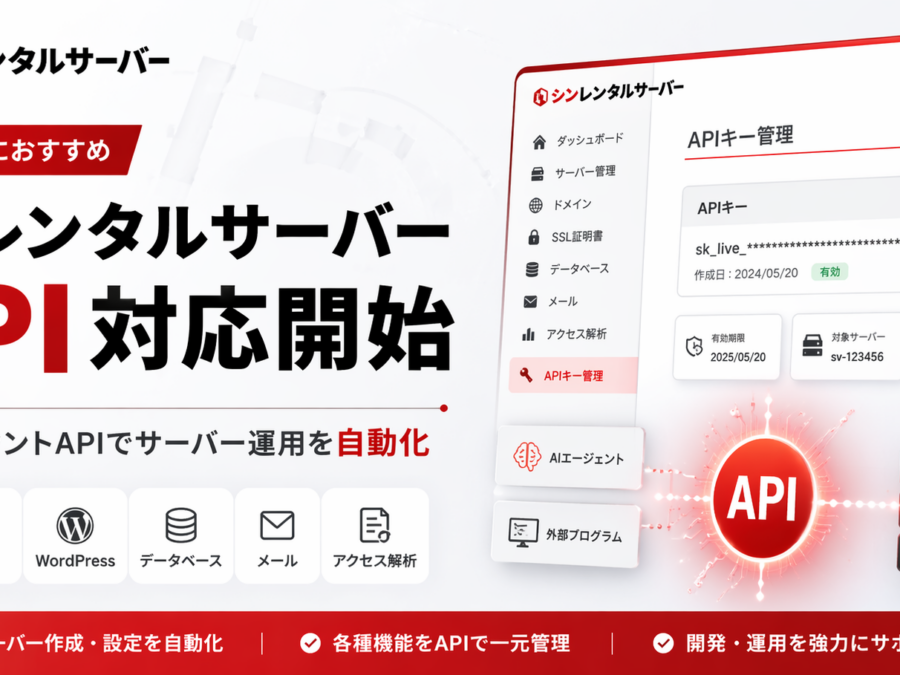
Shin Rental Server began offering the “Shin Account API” on April 22, 2026, making it possible to execute major server panel operations as REST APIs from external programs and AI agents. Supported items include server information, domains, subdomains, SSL, DNS records, mail accounts, mail filtering, easy WordPress installation, MySQL, FTP, Cron, PHP version, access logs, error logs, and more.
To be honest, this is a pretty big deal.
This is not just a “new feature added”;
it changes server operations from manual work by people to automation and AI-first workflows.
I think servers in this category are a very good option. Even from the perspective of actually contracting and using it, I feel that it is moving not only in terms of performance and ease of use, but also toward the direction that will grow in the coming era.
What’s more, Shin Rental Server, Shin VPS, and Shin Cloud Desktop for FX are services in the Xserver Group lineage, and as of October 1, 2025, the operation of these services has been transferred to Xserver Inc. They are also listed in Xserver Inc.’s service lineup.
In other words,
it has a reliable operating base and has also advanced to API support—that is the current strength of Shin Rental Server.
Why Shin Rental Server’s API support matters so much
The value of API support may be a little hard for beginners to grasp.
Put simply,
it lets you run tasks that you used to click through in the admin panel directly from a program.
For example, when creating a new site, you usually have tasks like these:
- Add a domain
- Set up SSL
- Install WordPress
- Create a database
- Create a mail account
- Configure Cron
- Check the PHP version
Until now, many of these were manual tasks.
But with the Shin Account API, this flow becomes much easier to handle from external tools, custom systems, and AI agents.
In other words, Shin Rental Server is no longer just
“a rental server you simply rent” but a server that can automate operations.
A lot is possible.
However, to be precise, “server-side setup and configuration” and “building the site itself” are separate layers.
To give the conclusion first:
1. Automating WordPress installation and related setup is very realistic
2. Creating a site design template and initial pages is also quite possible depending on the combination
3. But “everything is completed perfectly in one shot exactly as desired” still requires design and verification
That is the most accurate understanding.
What you can do with the Shin Account API
The main functions available through the Shin Account API are quite extensive. According to the official manual, the following operational areas are covered.
1. Add or change domains and subdomains
This directly supports automation when launching a new site.
The benefit is especially large for people managing multiple projects.
2. Turn SSL on/off
You can manage free independent SSL settings through the API, making it easier to standardize the initial setup flow when publishing a site.
3. Get, add, change, and delete DNS records
Being able to API-enable even the somewhat tedious DNS settings in server operations is a big advantage.
4. Create mail accounts and configure forwarding
This makes it easier to automate the issuance of customer email addresses and forwarding settings.
5. Install, change settings for, and uninstall WordPress
This is a very strong point.
For people handling many WordPress projects, it can significantly reduce the burden of initial setup.
6. MySQL settings
You can handle database and MySQL user creation and deletion, as well as permission settings, through the API.
7. FTP accounts, Cron, and PHP version settings
It covers many of the settings commonly used in production, maintenance, and development work.
8. Access log and error log retrieval
This also makes it easier to use for operational monitoring and troubleshooting.
Shin Rental Server is a good choice for the AI era
As AI usage continues to spread,
whether a server has an API is truly important.
The reason is that, to let AI do work,
you need something it can actually execute against.
For example, in the future, workflows like these may become more common:
- “Create a new site environment.”
- “Add this domain and enable SSL.”
- “Install WordPress and create an admin email.”
- “Check the logs and make sure there are no issues.”
If there is no API on the server side, you end up going back to manual work.
But Shin Rental Server has already anticipated that need.
This does not mean everyone should fully automate everything right now.
However, in terms of future expandability, it is very valuable.
Who Shin Rental Server is recommended for
Shin Rental Server is especially suited to the following people.
People who want to run WordPress blogs or sites
Looking at the official feature list and API coverage, the major functions needed for WordPress operations are all there.
People managing multiple sites
As the number of sites grows, so does the accumulation of setup work.
People in that situation are more likely to feel the value of API support.
People doing production, maintenance, or small-scale development
Routine tasks such as client email setup, SSL configuration, WordPress deployment, and Cron configuration become easier to organize.
People who want to introduce AI and automation in the future
Even if you mostly work manually now, leaving future options open matters a lot.
Just having an API can greatly change what you can do later.
Can Shin Rental Server be trusted? Is it part of Xserver?
This is probably something many people wonder about.
In conclusion, Shin Rental Server, Shin VPS, and Shin Cloud Desktop for FX are part of the Xserver Group service lineage. After some services were transferred to Shin Cloud Inc. at the end of 2023, their operation was transferred to Xserver Inc. on October 1, 2025. In addition, services such as Shin Cloud Desktop for FX are listed in Xserver Inc.’s official service lineup. Xserver Inc.’s company history also mentions the launch of Shin Rental Server and Shin VPS.
So,
this is not an unknown startup service with an unclear operator.
I think this is something you can view as a reassuring factor.
If you’re actually signing up, Shin Rental Server is the main candidate
For blogs, company sites, owned media, and WordPress operations, Shin Rental Server is the main candidate to consider first.
The official site also provides a feature list and a business plan for corporate users, making it easier to choose according to your needs. The business plan also includes guaranteed CPU and memory allocation.
And most importantly, it now has the clear differentiator of
API support starting.
In ordinary rental server comparisons, people tend to focus only on price, capacity, and speed.
But from now on, whether it can support automation and AI utilization will also matter.
In that sense, Shin Rental Server is very interesting.
PR Shin Rental Server here

If you want more freedom, Shin VPS is also a strong option
If you want something more flexible than a shared rental server, Shin VPS is a candidate.
The official Shin VPS page highlights NVMe SSD, storage expansion in 100GB units, and one-click scale-up.
In other words, it is a good fit for people who want to:
- Build freely with root privileges
- Run their own applications
- Host automation infrastructure or a development environment
- Have a more flexible server configuration
For those people, Shin VPS is the better fit.
PR Shin VPS here
For FX automated trading, a dedicated VPS for automated trading is also a very good match
For FX automated trading, instead of a regular rental server or a general-purpose VPS,
it can be very rational to choose a service specialized for that use from the start.
Shin Cloud Desktop for FX officially promotes automatic recovery and notifications for MT4/MT5, and the support manual also explains how to set up automatic restarts when MT4/MT5 stops. News updates have also announced additional features for the Windows plan such as “automatic backup” and “monitoring and automatic recovery for MT4/MT5.”
That is a big deal for FX automated trading.
- You don’t want to keep your home PC running all the time
- You want MT4 or MT5 to run stably
- You want to reduce the risk when it stops
- You want a clear environment dedicated to FX
For people like that, it is a very good match.
PR Dedicated VPS for FX automated trading here
If you’re not sure which one to choose
The choice is simple.
If your focus is site management and WordPress
Shin Rental Server
If you prioritize freedom and also want to develop or build things
Shin VPS
If you want to run FX automated trading stably
Dedicated VPS for FX automated trading
These three have very different purposes,
so choosing based on “what you want to do” is the least risky approach.
Summary. Shin Rental Server became much more attractive with API support
The start of API support for Shin Rental Server is a very meaningful update.
With the Shin Account API launched on April 22, 2026, major operations such as domains, SSL, DNS, mail, WordPress, MySQL, Cron, and log retrieval can now be handled via API. In addition, multiple API keys can be created, and each plan has limits on the number of keys and requests.
This is a very strong entry point for
connecting rental servers with AI and automation.
On the operations side as well, the Shin series services are now centralized under Xserver Inc., which makes them easier to evaluate from a reliability standpoint.
So if you’re signing up now,
- you want something easy to use right now
- you want a path toward future automation
- you want to choose a service from a trustworthy operator group
then Shin Rental Server is a very strong candidate.
PR Shin Rental Server here
PR Shin VPS here
PR Dedicated VPS for FX automated trading here
Gentle Next Step
読み終えた余韻の先で、 次の一歩を静かにつなぐ。
お問い合わせ、サービス案内、資料請求、無料相談など、記事の流れを崩さず自然に次の行動へつなげるためのCTAです。画像・文言・色はテーマ設定から自由に変更できます。



Conversation
Be the First Voice
読んだだけで終わらせないでください。
感じたことを、コメント・発信・メモなど、何かの形で外に出してみてください。
反応した瞬間から、変化は始まります。
この場所に、最初の感想や気づきをそっと残せます。